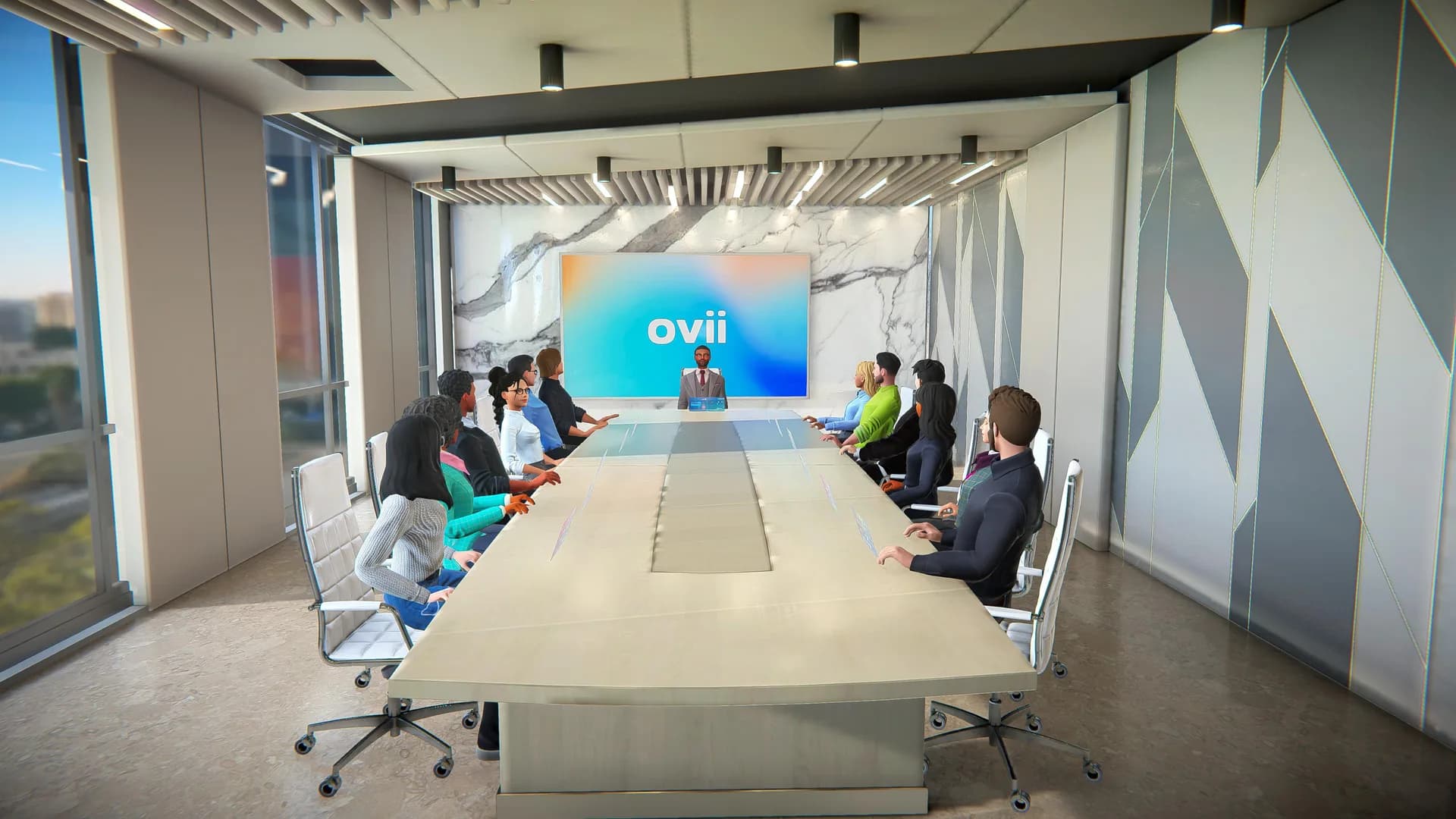
Viora - Web-Based 3D Conferencing Platform
Led the development of a multiplayer 3D conferencing platform in Unity WebGL from MVP to production, with WebRTC voice, screen sharing, and custom environment art.
Viora is a real-time 3D conferencing platform that runs entirely in the browser. No downloads, no plugins. Users join meetings as avatars in fully interactive 3D spaces with voice, video, and collaboration tools. I led the frontend and multiplayer development from first prototype to production, and handled all technical art and environment design.
The Hard Part
Building a 3D conferencing app in WebGL means solving problems that don't exist in traditional video conferencing. The browser is a hostile environment for real-time 3D: limited GPU access, no threading, strict memory budgets, and users on hardware you can't control. Now add real-time multiplayer, live voice and webcam streams, screen sharing, interactive whiteboards, and the expectation that it "just works" on a mid-range laptop running Chrome.
Every feature had to be built twice in your head: once for correctness, once for "will this still run at 30fps on a 2018 Intel laptop with integrated graphics?"
Multiplayer Architecture
The real-time layer was built on WebRTC for peer-to-peer voice and video, with WebSockets handling session state, avatar synchronization, and in-scene interactions. Avatar movement used client-side prediction with server reconciliation to keep things feeling responsive even on higher-latency connections.
I built the initial backend on GameSparks for fast prototyping: matchmaking, session management, player data, and room state persistence. This let us iterate quickly on the meeting experience without waiting for backend infrastructure. As the product matured and enterprise clients started coming in, we migrated to a custom in-house backend built on Node.js and AWS. I worked closely with the backend team throughout the transition, handling all client-side integration, testing edge cases around session handoffs, reconnection logic, and state synchronization.
Session management supported multiple concurrent rooms, dynamic join/leave, role-based permissions (host, presenter, attendee), and persistent room configurations that could be saved and reloaded.
Core Features
The meeting experience went well beyond avatars in a room:
- Voice and video chat: WebRTC-based, with spatial audio so conversations felt natural in 3D space
- Screen sharing: Stream a desktop or application window onto in-scene surfaces
- Interactive whiteboards: Real-time collaborative drawing synced across all participants
- Presentation mode: Dedicated stage areas with speaker spotlighting and audience seating
- UI system: Built a custom in-game UI for meeting controls, participant lists, chat, and settings, all running inside the Unity WebGL canvas
Environment Art
Designed and built all 3D meeting spaces using a modular kit approach. Boardrooms, lounges, expo halls, keynote stages, and private meeting booths, each with a distinct visual identity but sharing a consistent art style and material palette.
The modular system was built on a snapping grid with interchangeable wall, floor, and ceiling modules. Furniture and props were separate prefabs that could be placed freely. This made it fast to spin up new environments for different client needs without rebuilding assets from scratch. All materials used a shared PBR workflow with baked lightmaps for ambient lighting and a small set of real-time lights for accent and atmosphere.
WebGL Optimization
This is where most of the ongoing engineering effort went:
- Draw call batching: Static and dynamic batching, combined with aggressive mesh merging on environment geometry to keep draw calls under budget
- Texture management: Compressed textures (ETC2/ASTC), texture atlasing, and runtime quality tiers based on detected GPU capability
- Memory profiling: Regular profiling passes to catch WebGL memory leaks, which behave differently than native Unity builds and can silently degrade performance over a long meeting session
- Build size: Aggressive code stripping, asset compression, and addressable loading to keep the initial download reasonable for a browser-based app
- Runtime quality scaling: Automatic detection of GPU tier at startup, adjusting shadow resolution, post-processing, and texture quality so the experience adapted to each user's hardware
CI/CD & Deployment
Set up the full build and deployment pipeline: GitHub Actions for automated Unity WebGL builds triggered on merge to main, deployed to AWS S3 with CloudFront CDN for global delivery. Build artifacts were versioned and cached so rollbacks were instant.
Outcome
Viora shipped as a production-ready platform where real teams held real meetings in 3D. No install, open a link, you're in. The migration from GameSparks to a custom backend gave the product the stability, security, and flexibility it needed for enterprise deployments. Over four years of development, the platform grew from a single-room MVP to a multi-environment, feature-rich collaboration tool serving international clients.
Need someone to connect multiplayer, backend services, and visuals in your own product? Explore my Unity development and multiplayer services. For browser-specific requirements, see my Unity WebGL development services.
Gallery
Videos
Viora Virtual Meeting Tutorial
Viora Create New Meeting Tutorial